
Insights
Common Problems When Converting RBC Credit Card Statements to CSV
Why Parsing RBC Credit Card Statements Is More Difficult Than It Appears
Many accountants, bookkeepers, business owners, and financial analysts need to convert RBC credit card statements into CSV files for bookkeeping, expense analysis, reconciliation, and importing into accounting software.
While the statement may appear to contain a simple transaction table, accurately extracting every transaction is more challenging than it first appears. RBC credit card statements contain several formatting quirks that can easily lead to missing or incorrect data when using generic PDF converters.
Our parser combines OCR, document intelligence, and Generative AI to understand the structure of the statement and produce clean, analysis-ready CSV output.
Challenge 1: Transaction Dates Do Not Include the Year
RBC credit card statements typically display only the month and day for each transaction. Since the year is omitted, simply extracting the visible text is not enough to produce accurate CSV data.
For example:
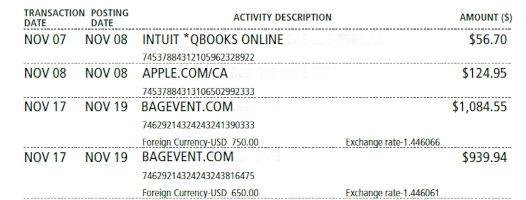
RBC transaction date without years.
The year is often omitted from individual transactions and only appears elsewhere in the statement.
Most parsers struggle with this and default to the current year even if the statement is from a previous year, resulting in inaccurate data.
Our Solution
Our AI analyzes the statement period and transaction sequence to intelligently determine the correct year for every transaction. This ensures exported data contains complete and accurate transaction dates.
Challenge 2: Statements Can Span Two Calendar Years
Statements generated around the end of the year often contain transactions from both December and January. Without understanding the statement period, many converters assign every transaction to the same year.
Our Solution
Generative AI evaluates the complete statement and automatically assigns the correct year to each transaction, even when a statement spans multiple calendar years.
This helps prevent reporting errors and reduces manual cleanup work.
Challenge 3: Foreign Currency Information Appears Inside the Description
International purchases often include the original transaction currency directly within the description rather than in a dedicated column. This makes it difficult to separate the merchant description from the foreign currency amount.
Our Solution
Our parser intelligently identifies and extracts foreign currency values while preserving a clean merchant description in the output.
Challenge 4: Exchange Rates Are Embedded in Transaction Descriptions
For foreign transactions, RBC frequently includes the exchange rate as part of the transaction description. Generic table extraction tools typically treat this as plain text.
Our Solution
Our parser recognizes exchange rate information and extracts it into structured data instead of leaving it buried inside the description.
Challenge 5: Footer Content Being Extracted as Data
Page numbers, promotional messages, legal notices, and continuation text often appear between pages or at the bottom of statements. Basic PDF extraction tools frequently include this information in the exported data.
Our Solution
Our cleanup process removes footer content before the final CSV is generated, producing clean, consistent output that requires little or no manual editing.
Challenge 6: Header Information Can Be Mistaken for Transactions
Credit card statements contain page headers, account summaries, and other informational text that may resemble transaction rows during PDF extraction.
Our Solution
We automatically identify and remove non-transaction content, ensuring only genuine transactions appear in the exported CSV.
Why Accurate Statement Parsing Matters
Even small extraction errors can create significant downstream issues:
- Incorrect account reconciliations
- Reporting inaccuracies
- Duplicate transactions
- Missing transactions
- Additional manual review effort
For accountants and finance teams processing large volumes of statements, reliable extraction can save hours of manual work.
Convert RBC Credit Card Statements to CSV with WhizIntell
WhizIntell combines OCR, document intelligence, and AI-powered validation to extract transaction data from RBC credit card statements and convert it into clean, structured CSV files.
Whether you are processing a single statement or large volumes of financial documents, our platform helps reduce manual effort and improve accuracy.
Upload your RBC statement today and see how quickly you can transform PDF statements into analysis-ready data.