Insights
Common Problems When Converting RBC Bank Statements to CSV
Why Parsing RBC Bank Statements Is More Difficult Than It Appears
Many businesses, accountants, bookkeepers, and financial analysts need to convert RBC bank statements into structured formats such as CSV or Excel for reconciliation, bookkeeping, reporting, and analysis.
At first glance, extracting transactions from a PDF bank statement may seem straightforward. However, RBC statements contain several formatting challenges that can make accurate data extraction surprisingly difficult.
This article explores some of the common challenges encountered when parsing RBC bank statements and how WhizIntell's AI-powered extraction engine addresses them.
Challenge 1: Transaction Dates Do Not Include the Year
Many RBC statements display transaction dates using only the month and day.
For example:
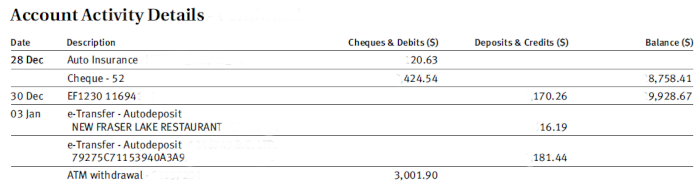
RBC transaction date without years and dates not repeated on every line.
The year is often omitted from individual transactions and only appears elsewhere in the statement.
Most parsers struggle with this and default to the current year even if the statement is from a previous year, resulting in inaccurate data.
Our Solution
WhizIntell uses AI-assisted date interpretation to determine the correct year for each transaction based on:
- Statement period
- Transaction sequence
- Adjacent transaction dates
- Historical date patterns
This ensures exported data contains complete and accurate transaction dates.
Challenge 2: Dates Are Not Repeated on Every Transaction Line
Some RBC statement formats group multiple transactions under a single date heading. Like in the previous example, the date may only appear once for a series of transactions, leaving subsequent rows without an explicit date.
In these cases, subsequent rows may not contain a date value.
Traditional parsers often leave these rows blank or incorrectly assign dates.
Our Solution
WhizIntell uses intelligent transaction grouping and context-aware processing to identify missing dates and populate them correctly.
This ensures every exported transaction contains a complete transaction date.
Challenge 3: Statements That Cross Calendar Years
A common edge case occurs when a statement period spans two calendar years.
For example:
- December 2025 transactions
- January 2026 transactions
Traditional extraction tools often incorrectly assign all transactions to a single year, resulting in inaccurate financial records.
Our Solution
WhizIntell automatically detects cross-year statement periods and intelligently assigns the correct year to each transaction.
This helps prevent reporting errors and reduces manual cleanup work.
Challenge 4: Header Information Appearing as Transactions
RBC statements often contain non-transaction content within the same extraction area as transaction tables.
Examples include:
- Account summaries
- Opening balances
- Section headers
- Page titles
Basic PDF extraction tools can mistakenly interpret this information as transaction data.
Our Solution
Our extraction engine identifies and removes non-transaction content before generating the final CSV output.
The result is cleaner data with fewer false transactions.
Challenge 5: Footer Content Being Extracted as Data
PDF statements frequently contain footer information such as:
- Page numbers
- Legal disclaimers
- Customer service information
- Promotional messages
When not handled properly, these elements can pollute exported datasets.
Our Solution
WhizIntell automatically detects and filters footer content to ensure only valid transaction records are included in the output.
Challenge 6: Non-Standard Debit and Credit Column Names
RBC statements can use different terminology and layouts depending on account type and statement version.
Examples may include:
- Withdrawals
- Payments
- Debits
- Credits
- Deposits
- Amount
Many extraction systems rely on fixed column names and fail when the format changes.
Our Solution
WhizIntell uses AI-powered column recognition to identify debit and credit values even when column names vary between statement formats.
This improves extraction accuracy and reduces the need for manual mapping.
Why Accurate Statement Parsing Matters
Even small extraction errors can create significant downstream issues:
- Incorrect account reconciliations
- Reporting inaccuracies
- Duplicate transactions
- Missing transactions
- Additional manual review effort
For accountants and finance teams processing large volumes of statements, reliable extraction can save hours of manual work.
Convert RBC Bank Statements to CSV with WhizIntell
WhizIntell combines OCR, document intelligence, and AI-powered validation to extract transaction data from RBC bank statements and convert it into clean, structured CSV files.
Whether you are processing a single statement or large volumes of financial documents, our platform helps reduce manual effort and improve accuracy.
Upload your RBC statement today and see how quickly you can transform PDF statements into analysis-ready data.